
t: 800.390.2129
e:
school yearbooks

 
Updates
NOV 16, 2009
FundcraftYearbooks

New yearbook website. Yearbook creation with Yearbook software from LumaPix. Read more »

NOV 16, 2009
FotoFusion™ Software

Yearbook software from LumaPix used to develop school yearbooks. Read more »

NOV 30, 2007
FamilyMemories.com

Photobook and book creation software. Used for any type book, mainly your photobook or photo album. Read more »

FEB 04, 1999
SchoolMemories.com

School yearbooks, athletic photo books, club activity books, etc. Read more »

Software Information For School Yearbooks
school yearbooks

            LumaPix-FUNDCRAFT Yearbook Software

Instructions for Downloading Yearbook Software.
1) Download software.

2) You may practise using the "trial" version.
    (you can not save your file).

3) To use the software, call to place an order and complete your Contract with FundcraftYearbooks. Once your contract is completed you can open your yearbook software to create, save & print.

4) Open and begin using Yearbook Software. Choose new project. Choose from 9 different templates, clipart, images, custom images, populate pages, build pages, etc. Navigation is easy with buttons on the bottom of the page. Complete and Save your yearbook project as [filename.scrap]. Once you save your file, Go to the "output tab" (near top right) to upload your file. Choose "Output to Publisher." This file uploads to our server, so we can print your yearbook.

yearbooks online yearbooks online yearbooks online yearbooks online yearbooks online yearbooks online yearbooks online yearbooks online yearbooks online yearbooks online yearbooks online yearbooks online yearbooks online yearbooks online yearbooks online yearbooks online yearbooks online yearbooks online yearbooks online yearbooks online yearbooks online yearbooks online yearbooks online yearbooks online yearbooks online yearbooks online yearbooks online yearbooks online 


Fundcraft Yearbooks is able to accept complete PDF yearbook files from software you may already be using. The PDF must be high resolution, have all fonts embedded and at the correct size in a continuous layout. Margins for images and text need to be .5” for all outside edges and .7" for the gutter at a paper size of 8.5"x11". Yearbooks can have a bleed with an additional 1/8” image area.

Fundcraft Yearbooks also offers the award winning FotoFusion™ software free to its customers ordering 100 or more yearbooks. FotoFusion™ offers a fully-featured, all-in-one solution for laying out and submitting professional caliber school yearbooks. FotoFusion™ is based on FotoFusion Extreme™ — the acclaimed layout tool from LumaPix® — with the addition of tools specific to yearbook creation. FotoFusion™ includes powerful layout tools, real-time direct manipulation, powerful architecture, non-destructive, with a resolution-independent composition environment.

FotoFusion™ is easy to learn with: video tutorials, tooltips, extensive help, most controls are direct.

PSPA CD import, users can import an industry-standard “photographers CD”, which contains student portraits and a text file describing them. Users can easily query to find students in a particular grade, home room, last name, etc. Records can be re-imported to integrate or replace existing student records.

FotoFusion™ Demo Video - 04:01 (minutes)


FotoFusion™ Software

Fundcraft provides FotoFusion™ Software to its customers. This software specializes in yearbook layout.

Featured Yearbooks
school yearbooks

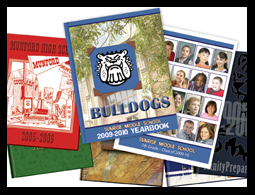
The yearbook reflects the unique value and spirit of your school. We are here to work with you as a team to present a beautiful yearbook that you will be proud of!